
Will the Ultra-Portable Khadas Mind 2 Be Your All-in-One Setup?
Introduction: This article is part of the Khadas Mind review program organized by SSPAI. You’ll find more information about the program at the end of this article.
For years, performance and portability have felt like a trade-off you just had to accept. Want real desktop power? Get a desktop. Need something mobile? You’re stuck with a chunky gaming laptop that’s… not exactly fun to carry around.
Then along comes the Mind 2 series, trying to cheat the system: a ridiculously compact mini PC for portability, paired with a sleek external GPU dock for when you need serious horsepower. Sounds like the “have your cake and eat it too” setup. But does it actually work?
I Was Not Prepared for How Small This Thing Is
I’ve been using a Mac mini M2 for years, so in my head, “mini PC” still meant something like half an A4 sheet and a few centimeters thick. When the package arrived, I saw this big box and thought, “Alright, standard stuff.”
Then I opened it.
Mind 2 itself was the smallest box inside.

And when I finally held it... Yeah, that was a moment. It’s smaller than an iPad mini by a noticeable margin, roughly a quarter of an A4 sheet, and only slightly thicker than a phone with a case. It genuinely makes you pause and go, “Wait, mini PCs can be this small now?”
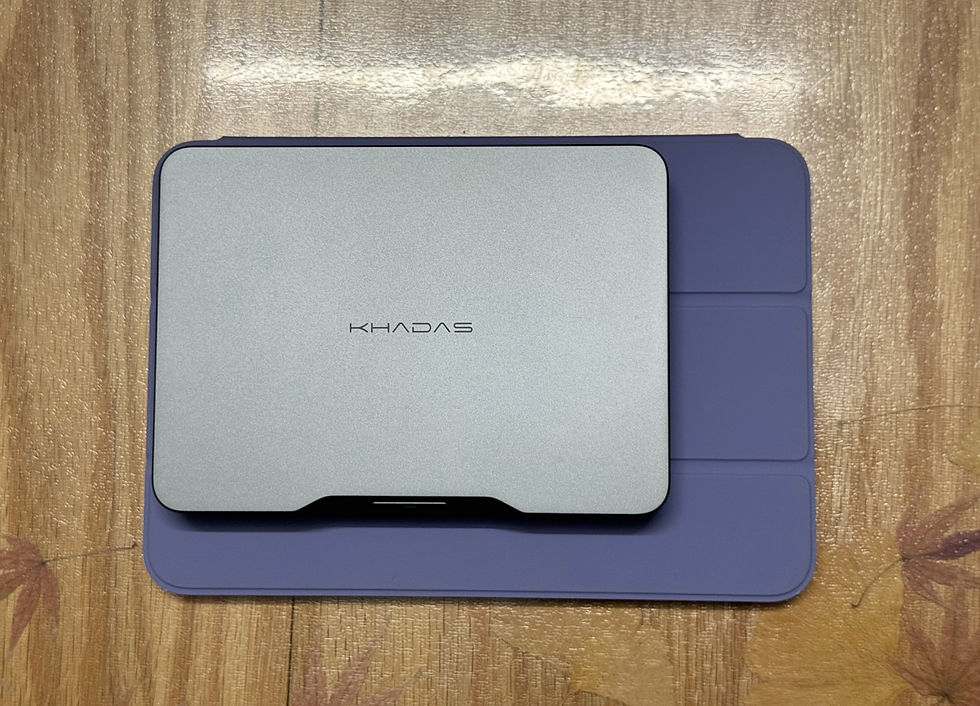
Mind 2 is noticeably thinner than an iPad mini, and it feels great in hand.
A Portable Core, With Optional Muscle
The unit I tested packs an Intel Core Ultra 7 155H and 64GB RAM. For everyday work, coding, and general use, it’s more than enough.
Power is simple too. A single 65W+ USB-C charger gets the job done. In the era of GaN chargers, that means you don’t need to carry a bulky power brick.
There’s also a built-in 5.55Wh battery, which turns out to be quite practical. When switching between docks, the system doesn’t immediately shut down. You can unplug and move it without interrupting what you’re doing.

Unlike bulky gaming laptop power bricks, Mind 2 runs on a single USB-C cable.
Snap On a GPU, Get a Different Machine
Pair it with the Khadas Mind Graphics and things start to change.
The magnetic connection is clean and easy to use. No cables to deal with, just snap it into place.
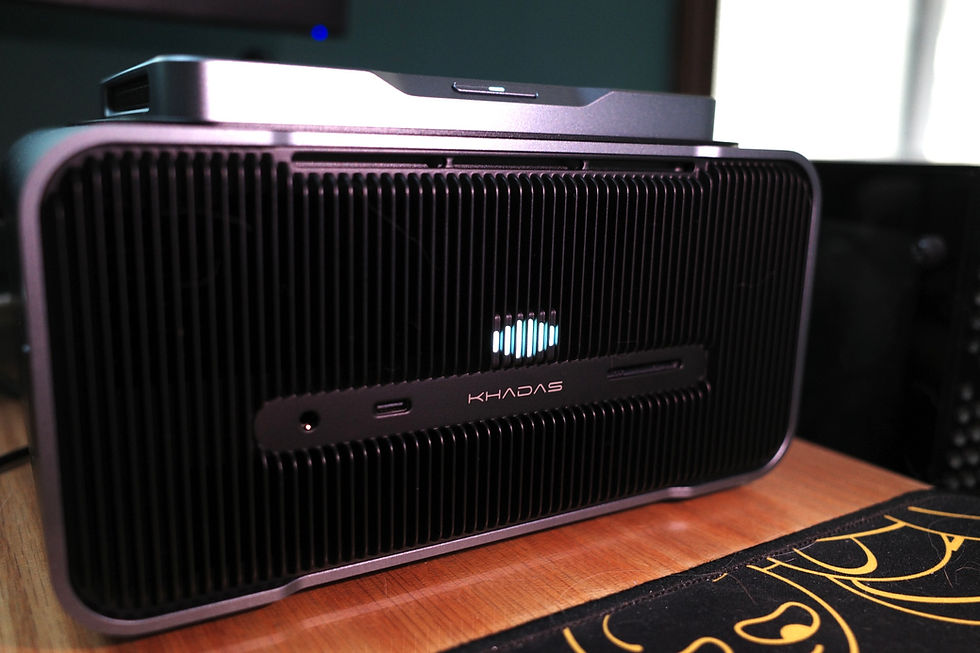
Inside is an NVIDIA RTX 4060 Ti. Performance-wise, it’s decent, though not a massive leap if you’re already used to something like a 3060 Ti.
3DMark Fire Strike Extreme: ~15,250–15,293
GPU temps: mostly between 60–65°C during testing (room temp 21°C)

In games:
Cyberpunk 2077 @ 1440p, High, DLSS (no ray tracing): ~140 FPS
With ray tracing (Low + DLSS): ~110 FPS
That’s enough for smooth AAA gameplay without pushing extreme settings.

1440p high settings with DLSS, no ray tracing — around 140 FPS.

1440p high settings with DLSS, ray tracing on low — around 110 FPS.
The Not-So-Perfect Part: Cooling Quirks
Here’s where things get a bit... weird.
The GPU dock handles thermals beautifully, but the mini PC itself? Not quite there yet.
The fan behavior feels inconsistent: Sometimes it goes full jet engine at idle (while temps sit at 20–30°C). Other times, CPU temps climb past 70°C, and the fan barely reacts. A reboot can “fix” it, but then the fan might stay loud long after temps drop.
No current way to manually control the fan either. After checking with support, it seems this might need future firmware tuning.
So yeah, not a dealbreaker, but definitely something you’ll notice.

With no heavy load, the fan sometimes stays idle while CPU temperature hovers around 55°C; after reboot, the fan spins at full speed and keeps going even after temps drop.
Taking It Outside: The Portable Dream
A PC this small begs to be taken outside.
I tried bringing it to the office. Since my keyboard and mouse are Bluetooth with multi-device switching, setup was effortless. Plug in a display, and boom, you’re back in your own environment.
For my workload (mostly coding, not heavy local compute), I didn’t even need the GPU dock. The built-in ports were enough. Honestly, I barely missed a hub.

The rear I/O is quite complete, though having Ethernet would make it even better.
Reality Check: Travel Isn’t Always Plug-and-Play
I also took it on a business trip, thinking:
“Nice, I’ll just hook it up to the hotel TV and game.”
Yeah... no.
Modern hotel TVs don’t like you doing that. Hidden cables, locked inputs, disabled buttons—you name it.
So I panic-bought a portable monitor. Thankfully, Mind 2 works great with a single USB-C cable, and that setup actually turned out pretty nice. After work during a three-day trip, I got a few solid gaming sessions in.
At the time I was deep into BALL x PIT, ended up finishing a full run on Mind 2, and even jumped online with friends for Necesse. The Ultra 7 155H’s integrated graphics handle lighter games just fine.

With a portable monitor, keyboard, and mouse, Mind 2 delivers a desktop-like experience.
A Surprisingly Great Use Case: Game Streaming
After spending the whole day working at a desk, I usually don’t feel like sitting upright at another one just to play games. Streaming from the PC while lying in bed feels way more relaxed.
During the trip, I also tried streaming games to an iPad mini. This is actually one of the more fitting use cases for a portable setup like this: just keep the main unit powered on, and the tablet naturally takes care of display and touch input.
The catch is Windows 11. It doesn’t make this workflow particularly smooth. You can’t easily boot straight into the desktop and have a hotspot ready for the streaming device, so you still need an external screen and keyboard to get things set up first. Not exactly elegant.
If you paired this with AR glasses instead, though? That could be a killer combo.

Mind 2 works well as a streaming host.
So... Why Not Just Use a Laptop?
At this point, you might be wondering: if you still have to carry the main unit, a portable monitor, keyboard, and mouse… why not just bring a laptop?
Fair question.
For me, it’s simple. I use a Mac at work and a Windows desktop at home, with almost no need for mobile work—so a laptop never made much sense while Mind 2 fits into that lifestyle perfectly. But if you’re constantly on the move, a laptop is still the easier pick.
Mind 2 is portable, but using it portably still depends on having the right gear. Khadas has even launched their own keyboard-integrated portable display (Mind xPlay), but the question remains.

Khadas Mind xPlay
In the end, it’s not really built for ultimate on-the-go use. But if you move between a few fixed setups with screens and peripherals ready, it’s a clean way to carry your entire workspace with you.
In a nutshell:
Multiple fixed setups with monitors and peripherals → Mind 2 makes sense
Constant on-the-go computing → laptop still wins
Final Thoughts
If you’re chasing a true “one device for everything” setup, Mind 2 is a seriously compelling option.
Incredibly compact
Premium build
Flexible modular performance with the GPU dock
It’s the kind of device you can literally slip into your pocket and carry your entire computing environment with you.
But it’s not for everyone. If you prefer dedicated devices for work and play, or rely on completely separate platforms for work and gaming, this probably isn’t the best fit.
Still, as a modular, portable desktop that bends the usual rules? Khadas Mind 2 gets surprisingly close.
Author: Yorkson
Closing Note
This review was created for SSPAI’s Khadas Mind community testing initiative. Twenty SSPAI contributors will spend 30 days with Khadas Mind and share their hands-on impressions with honesty and transparency.
About SSPAI (sspai.com)
SSPAI is a leading digital lifestyle and consumer-tech platform in China. Built on a professional creator–driven model, it stands for objectivity, clarity, and editorial independence. SSPAI is committed to helping people improve productivity and quality of life through thoughtful methods and better digital tools.


I really enjoyed reading your insights on starting a career in SAP! The importance of learning SAP fundamentals and choosing the right module is especially helpful for beginners. For those interested in finance, SAP FICO Training in Chennai seems like a great way to gain practical knowledge of financial accounting and controlling. Have you explored any other SAP modules that could be useful for career growth?
I really enjoyed your insights on the Khadas Mind 2! The idea of an all-in-one setup sounds so appealing, especially for someone who enjoys games like dordle. Have you tried using it for gaming or productivity tasks yet?
Great new valid word on row two, preserving confirmed letters while testing fresh consonants and vowels 5 Letter Words
Strands Hint follows this principle effectively, each correct word makes the puzzle feel slightly less mysterious.
The Khadas Mind 2 looks like an absolute beast for a portable setup! The built-in battery for seamless dock-switching and the magnetic eGPU pairing are such clever design choices.
I’ve been experimenting with light gaming and streaming on portable displays as well, and having compact web tools on hand makes customizing overlays or stream assets super easy. For instance, if you ever need quick custom overlays, titles, or eye-catching retro visual effects for portable gaming streams, this glitch text generator gif is super handy to quickly create animated assets on the fly.
Firmware updates should hopefully fix those fan curve quirks soon—thanks for sharing such a detailed hands-on review!