
Part Investor, Part Analyst: My Take on Khadas Mind 2
Introduction: This article is part of the Khadas Mind review program organized by SSPAI. You’ll find more information about the program at the end of this article.
As a researcher in the primary market, half of my job is basically like being a VC: evaluating startups and testing their products. The other half is more like a data analyst, writing code and running data workflows.
My focus is on AI large models. When evaluating a startup’s LLM product, I often need to compare it against open-source models. I haven’t used a Windows machine in about ten years. I used to run everything locally on an Apple Silicon Mac. It works, technically, but the speed is slow, and the thermals are awful—overall, a pretty clunky experience. Sometimes macOS just can’t handle a model at all, and I end up spinning up a cloud server with an NVIDIA GPU. Not exactly convenient.
First Impressions of Mind 2
I was lucky to be offered the chance to try Khadas Mind 2 and see whether it could make my day-to-day work any smoother.
When the package arrived, I was surprised—it looked pretty big.But once I opened it, the size of the actual host unit really caught me off guard. The Mind 2 modular system consists of three main parts:
Mind 2 mini PC (referred to as “the host”)
Mind Dock (the expansion dock)
Mind Graphics (the external GPU dock)
Here’s the full family photo:

Most of the package’s weight and size comes from the eGPU dock, which makes sense since there’s only so much you can shrink a GPU. The host itself is smaller than a paperback.

The host slips easily into my backpack, and the Mind Dock is almost the same size. It adds a full set of ports, a fingerprint reader, and a volume knob.

The host attaches to each dock using a magnetic slot. This connector is officially called the Mind Link interface, which handles both data and power. Mind Link supports up to 256 GT/s, which translates to roughly 64 GB/s of bandwidth.
Putting Mind 2 to the Test
Gaming Performance
Once I received the product, I tested it with the games I usually play. First up was Baldur’s Gate 3, with all graphics settings maxed out. Using the host and Mind Graphics together, the game ran extremely smoothly with no stuttering at all.

Previously, I had been playing Baldur’s Gate 3 on a MacBook M1 Pro. Each time the game launched, it took several minutes, and I could only run it on medium settings. Occasional stutters were common. Now, seeing the game run fully maxed out and completely smooth was a refreshing experience.
I played for four hours straight, and Mind Graphics’ cooling performance was excellent. The metal casing helps dissipate heat quickly, and even after hours of play, the surface temperature hovered around 50–60°C.
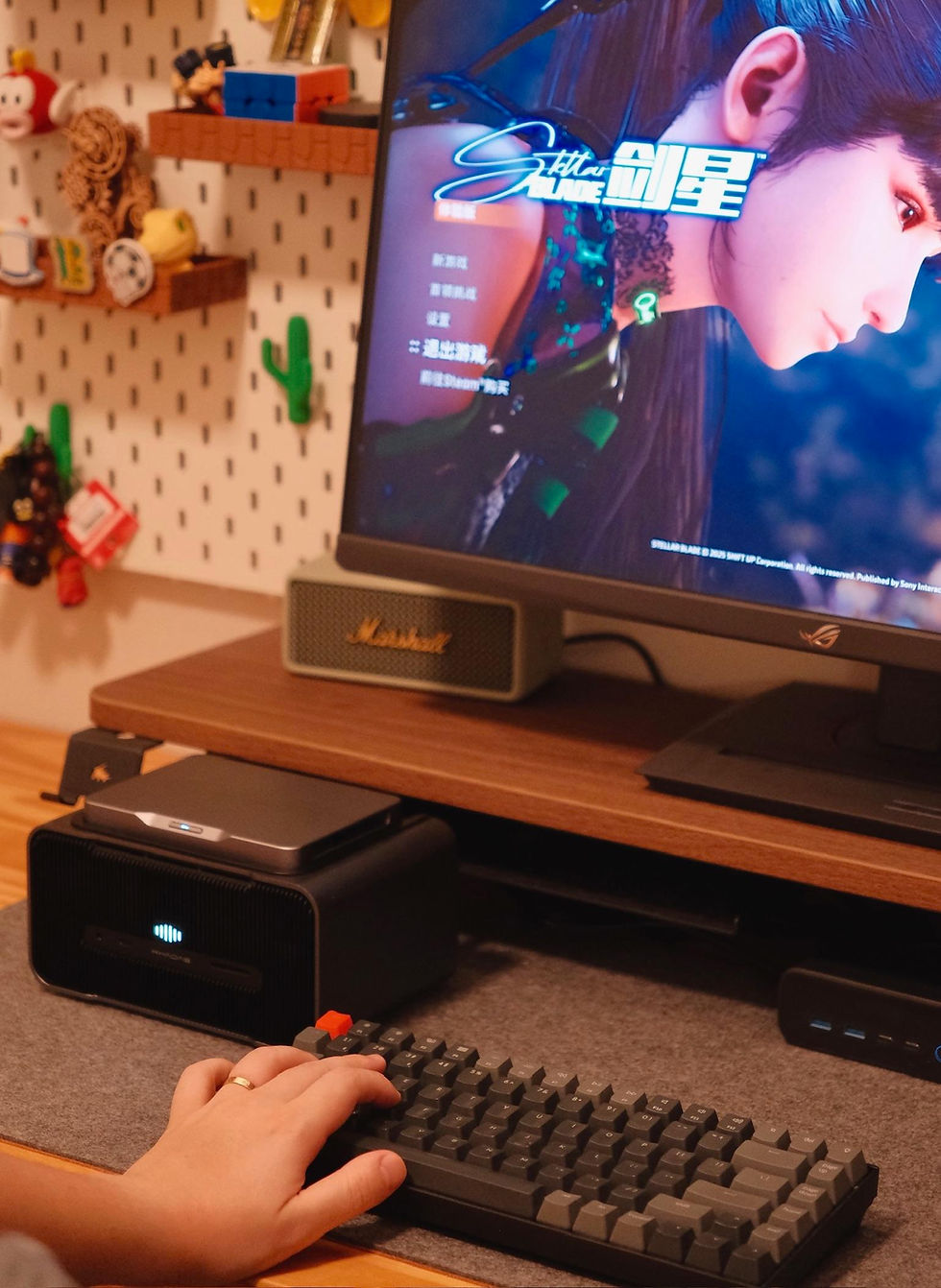
Next, I tested Forza Horizon 4, Stellar Blade (Demo), and Escape from Tarkov, all running at max settings. This shows that the NVIDIA RTX 4060 Ti 16GB inside the Mind Graphics performs efficiently under heavy load.


AI Model Workflows
Recently, I’ve been exploring Alibaba’s new Wan 2.2 video model. I installed Comfy UI to test the full text-to-video workflow.
The latest portable package from Comfy UI’s official GitHub is all that’s needed to run the test. While using it, I ran into a minor issue with Mind 2.
In the Mind App, the GPU driver listed is 32.0.15.8108, and the “check for updates” button does not find a newer version. However, this driver is actually quite outdated and prevents Comfy UI from running properly. I had to go to NVIDIA’s official website, download, and install the latest driver.
After updating, Comfy UI opened without issue. Using the built-in video generation template, I ran the Wan 2.2 5b small model to generate a text-to-video sequence. GPU usage is shown below:

The generated video screenshots are as follows. The entire process took about seven minutes. Although the model is only 5b, the results were still quite good.

Next, I tested Wan 2.2’s video face-swapping feature. For those following social media recently, you might know how impressive this model’s face-swap capabilities are. The workflow is complex, and the process took roughly 15 minutes. I won’t include the output here.

Workflows and Comparisons
During testing, I kept Mind Dock at the office and Mind Graphics at home. My daily commute became simple. I just dropped the main unit into my backpack and headed out.
Since all the cables stay plugged into the docks, the host (Mind 2) itself remains completely cable-free. At the office, I set it onto Mind Dock. At home, I set it onto Mind Graphics. It is straightforward and removes the constant hassle of plugging and unplugging cables. This alone makes Khadas Mind 2 very different from a Mac mini or an Intel NUC.
Some might ask whether a Mac mini can also be carried around. So, what makes Mind 2 special?
First, it helps to clarify something. Apple has never claimed Mac mini is portable. Both Mac mini and NUC are small so they can keep a desk clean and free up space. Small devices can naturally be carried around, but that is only a side effect of size. If portability is not something the product was built for, it will always come with compromises.
Here’s the back of my Mac mini:

All those cables need to be unplugged every time you move it from home to the office. You also need to shut it down before unplugging and set everything up again before turning it back on. It is inconvenient.
By contrast, the portability of Khadas Mind 2 is intentional. That is what makes it truly portable. When you remove the main unit from a dock, you simply lift it off. There is no shutdown required. It automatically enters sleep and keeps your entire workspace in place. Once you set it on a dock again, it resumes right where you left off. Since all cables remain attached to the docks, and the docks never move, the setup stays clean and you avoid the usual cable juggling.
My Investor’s Take on Where Khadas Mind 2 Stands
To wrap up, I want to evaluate Khadas Mind 2 the same way I usually assess early-stage startups. In early-stage research, we look beyond what a product is. We focus on the specific problem it solves and the space it occupies in the market.
For years, high performance and portability have been at odds. Users have had to choose between a heavy, high-performance laptop and a desktop or mini PC that offers performance but no mobility at all.
The smart idea behind Khadas Mind 2 is that it does not try to merge these two extremes. Instead, modularity completely separates the computing core (the main unit) from the scenario-specific hardware (the expansion dock and eGPU). This allows it to target a niche that has been overlooked: professionals who need to move between fixed locations, such as home and office, while keeping the same high-performance workflow.
To make its positioning clearer, here is a simple comparison I put together:
Test Dimension | Khadas Mind 2 (Host + Mind Dock + Mind Graphics) | High-performance Laptop (e.g., gaming laptop) | Mini PC (Mac mini / NUC) |
Peak Performance | Very high (desktop-class RTX 4060 Ti) | Medium to high (mobile GPUs limited by thermals and power) | Low to medium (integrated or low-power discrete GPUs) |
Workflow Portability | Very high (lift-and-go host, instant workspace switching) | Medium (carry power brick, reconnect peripherals) | Very low (host + power + all the cables) |
Commute Load | Very light (host only, lighter than a book) | Heavy (device plus large power adapter) | Medium (host plus power adapter) |
Upgradeability | High (future eGPU modules, expandable SSD) | Very low (core parts largely fixed) | Medium (upgradable RAM/SSD, GPU not upgradeable) |
On-the-go Work | None (not for travel use yet) * | High (built-in screen and battery) | None (not for travel use) |
* Khadas notes that Mind xPlay is coming soon. It’s a portable display with a keyboard and battery, made for mobile workflows.
Investor-Style Summary (SWOT)
Strengths
Precise fit: It solves the core pain point of switching the same high-performance workflow between fixed locations, offering better portability for workflows than laptops or mini PCs.
Performance delivery: The external GPU provides desktop-level performance and thermal capacity.
Long-term potential: Modularity creates strong upgrade paths, which could be a significant strength unique to Khadas.
Weaknesses
Software ecosystem: As an innovative product, supporting software like the Mind App still needs refinement. I encountered a driver update issue during testing.
Limited scenarios: It is not for people who need to work on trains or in coffee shops yet. Khadas says it will launch an xPlay portable display soon to address more mobile scenarios.
Opportunities
Professional users: AI researchers, video editors, 3D designers, and similar professionals are natural target users.
Hybrid work: As home-office hybrid work becomes more common, Mind 2’s value proposition will grow.
Threats
Cloud computing: More powerful cloud machines are a potential competitor, but latency, cost, and usability still favor local hardware for many workflows.
Laptop improvements: High-performance laptops are improving thermals and expandability via external docks, but physical limits remain.
Overall, Khadas Mind 2 is not designed to be a universal product. It is a focused productivity tool for a specific user group. Its modular approach opens a new lane in a market that has long felt mature.
Author: Qingnan
Closing Note
This review was created for SSPAI’s Khadas Mind community testing initiative. Twenty SSPAI contributors will spend 30 days with Khadas Mind and share their hands-on impressions with honesty and transparency.
About SSPAI (sspai.com)
SSPAI is a leading digital lifestyle and consumer-tech platform in China. Built on a professional creator–driven model, it stands for objectivity, clarity, and editorial independence. SSPAI is committed to helping people improve productivity and quality of life through thoughtful methods and better digital tools.


capybara clicker is a relaxing idle clicker game where players repeatedly click on an adorable capybara to earn points and gradually unlock upgrades that help increase their progress.
I appreciate your insights on Khadas Mind 2! I'm curious—how do you see it evolving in the future? Also, as a big fan of word games like quordle, I wonder if any of these analytical skills translate to strategic thinking in tech investments.
The Khadas Mind 2 strikes a great balance between performance and portability, especially when paired with an eGPU for gaming and AI workflows. The Mind Link enables quick and convenient setup transitions, catering to both work and Cool Games entertainment.